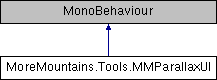
Use this class to bind a number of UI layers to the movements of a mouse cursor, or a mobile device gyroscope, or even have it be piloted by another script By setting different speed/amplitude values for each of your UI layers, you'll be able to create a nice parallax effect
More...
|
| virtual void | Start () |
| | On Start we initialize our reference position More...
|
| |
| virtual void | Update () |
| | On Update, moves all layers according to the selected mode More...
|
| |
| virtual void | MoveLayers () |
| | Computes the input data according to the selected mode, and moves the layers accordingly More...
|
| |
Use this class to bind a number of UI layers to the movements of a mouse cursor, or a mobile device gyroscope, or even have it be piloted by another script By setting different speed/amplitude values for each of your UI layers, you'll be able to create a nice parallax effect
◆ Modes
the possible modes used to pilot this parallax rig
| Enumerator |
|---|
| Mouse | |
| Gyroscope | |
| Script | |
◆ Initialization()
| virtual void MoreMountains.Tools.MMParallaxUI.Initialization |
( |
| ) |
|
|
virtual |
Initializes the start position of all layers
◆ MoveLayers()
| virtual void MoreMountains.Tools.MMParallaxUI.MoveLayers |
( |
| ) |
|
|
protectedvirtual |
Computes the input data according to the selected mode, and moves the layers accordingly
◆ SetReferencePosition()
| virtual void MoreMountains.Tools.MMParallaxUI.SetReferencePosition |
( |
Vector3 |
newReferencePosition | ) |
|
|
virtual |
Sets a new reference position, to use when in Script mode
- Parameters
-
◆ Start()
| virtual void MoreMountains.Tools.MMParallaxUI.Start |
( |
| ) |
|
|
protectedvirtual |
On Start we initialize our reference position
◆ Update()
| virtual void MoreMountains.Tools.MMParallaxUI.Update |
( |
| ) |
|
|
protectedvirtual |
On Update, moves all layers according to the selected mode
◆ _mousePosition
| Vector2 MoreMountains.Tools.MMParallaxUI._mousePosition |
|
protected |
◆ _newPosition
| Vector3 MoreMountains.Tools.MMParallaxUI._newPosition |
|
protected |
◆ _referencePosition
| Vector2 MoreMountains.Tools.MMParallaxUI._referencePosition |
|
protected |
◆ AmplitudeMultiplier
| float MoreMountains.Tools.MMParallaxUI.AmplitudeMultiplier = 1f |
a multiplier to apply to all layers' amplitudes
◆ Mode
the selected mode for this parallax setup. note that gyroscope mode is only available on mobile devices
◆ ParallaxLayers
| List<ParallaxLayer> MoreMountains.Tools.MMParallaxUI.ParallaxLayers |
a list of all the layers to pilot
◆ SpeedMultiplier
| float MoreMountains.Tools.MMParallaxUI.SpeedMultiplier = 1f |
a speed multiplier to apply to all layers' speeds
The documentation for this class was generated from the following file:
 1.8.18